
← febry.is-a.dev SSM
(01) · Visual Style Specification Cyber-Surrealism · Indonesia

SpotShift Mono.

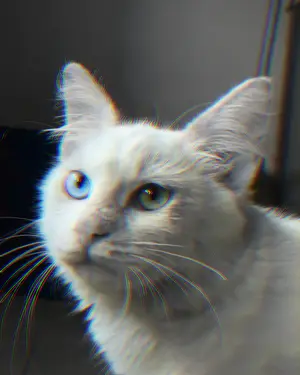
A high-contrast photography language. Strip the environment down to a monochrome foundation, keep at most three isolated colours alive, then push the RGB channels 2–5 px apart wherever those colours meet a hard edge.

Creator · Febry Est. 27 Sept 2026 Live spec
(02) The Pioneer Balikpapan · Indonesia

The mind behind the shift.

Febry
Creator & Pioneer · SpotShift Mono
1.2379° S · 116.8529° E
@syfebry_
Name Febry
Role Creator & pioneer of the SpotShift Mono visual style
Instagram @syfebry_
Portfolio febry.is-a.dev
Based in Balikpapan, Indonesia
Studying Desain Komunikasi Visual · Institut Teknologi Kalimantan
(03) Three rules Composition requirements

Three rules make it SpotShift.

01

Monochrome Base

Convert the background to black, white, and grayscale tones for maximum contrast. Everything that isn’t the subject goes grey.

Foundation · grayscale
02

Spot Colour Restriction

Isolated colour is limited to a maximum of three — one primary is recommended — applied only to the hero object of the frame.

Restriction · max 3
03

RGB Channel Shift

Displace the Red, Green, and Blue channels by 2–5 px across isolated colour areas and high-contrast boundaries. The signature.

Signature · 2–5px
(04) Tokens · Design system 5 mono · 3 spot · 2 shift

The language, tokenised.

Core Base Monochrome
Black
#0D0D0D
Dark
#1A1A1A
Gray
#808080
Light
#E5E5E5
White
#FFFFFF
Accent Spot Colors · max 3
Electric Blue
#0055FF
Neon Crimson
#FF0055
Cyber Green
#00FF88
RGB Shift Channels
DISPLACE
Red −3px · Cyan +3px · base centred
Allowed range
Shift · Red
rgba(255,0,0,0.8)
Shift · Cyan
rgba(0,255,255,0.8)
(06) Production workflow Adobe Photoshop

How the shift is made.

01

Monochrome base

  • Add a Black & White adjustment layer.
  • Mask the subject so its original colour survives — max 3 colours.
02

Channel separation

  • Duplicate the coloured object into two new layers.
  • Layer 1 — untick the R (Red) channel.
  • Layer 2 — untick G (Green) and B (Blue).
03

Execute the shift

  • Select the Move Tool (V).
  • Nudge one layer 2–5 px horizontally or vertically with arrow keys.
(07) Citation & attribution CC BY 4.0

Credit it properly.

Style SpotShift Mono
Creator Febry · https://febry.is-a.dev
License Creative Commons Attribution 4.0 International (CC BY 4.0)
Established 27 September 2026
© 2026 Febry. All rights reserved.